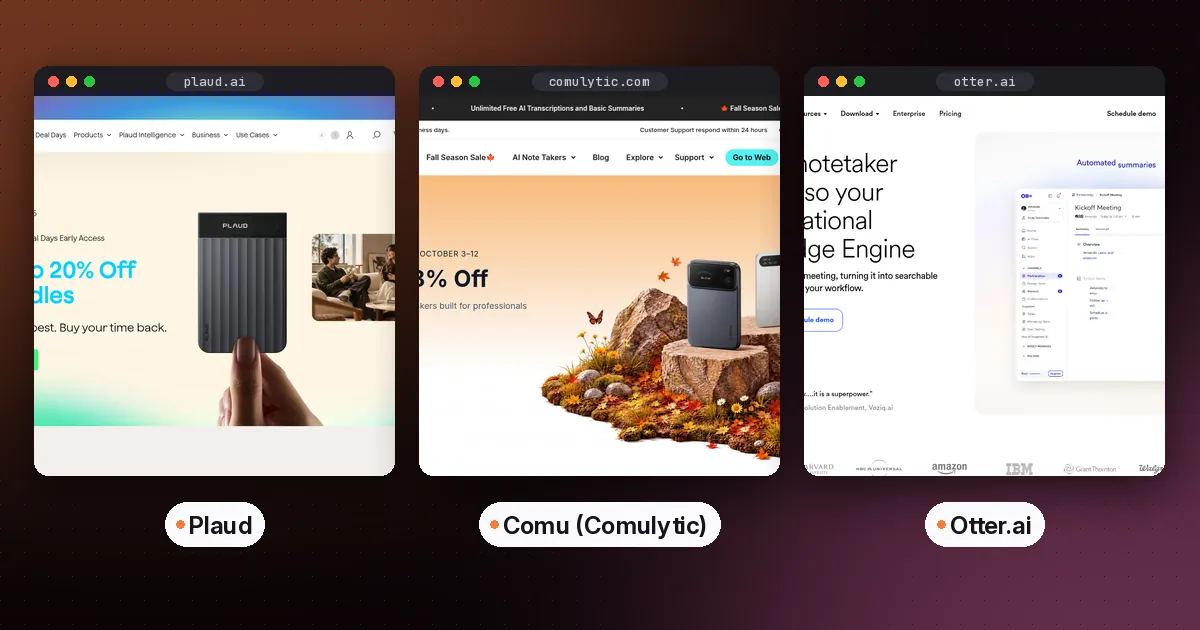
An AI note taker device is a small recorder that captures in-person conversations and phone calls, then uses an app to transcribe and summarize them. Buy one if many of your important conversations happen away from a laptop. Plaud Note Pro is the most capable all-rounder, Comu Note Pro gives you unlimited free transcription, and Pocket suits people who want a screenless clip-on that records thoughts as well as meetings.
If most of your meetings happen on Zoom, Teams or Google Meet, you probably don't need hardware at all, and a software note taker will serve you better. This guide explains when a device makes sense, compares the three most-searched options on price and subscriptions, and covers the legal side of recording. Prices and specs come from each vendor's site, checked on October 5, 2026. Hardware prices change often with sales, so confirm before you buy.
When an AI note taker device makes sense
A dedicated recorder earns its place in a few situations.
- In-person meetings and site visits, where opening a laptop would be awkward or impossible.
- Phone calls, since phones make call recording hard. Some devices pick up calls through a contact microphone instead.
- Long days away from a charger, because a recorder's battery lasts far longer than a phone running a recording app.
- Discretion, when you want a small device on the table rather than a phone that keeps lighting up.
If none of those apply, start with the free plan of a software tool. Our guide to the best AI note taker for meetings covers the options.
AI note taker devices compared
| Item | Plaud Note Pro | Comu Note Pro | |
|---|---|---|---|
| Hardware price | $189 list price | See the vendor's site (on sale when we checked) | See the vendor's site |
| Free transcription | 300 minutes a month (Starter) | Unlimited, with basic summaries | Unlimited standard transcription |
| Paid plan | Pro, $8.33 a month billed annually (1,200 minutes); Unlimited also available | Premium, $10 a month billed annually or $14.99 monthly | Pro, $19.99 a month |
| Recording time | Up to 50 hours | Up to 45 hours | 4-day battery |
| Phone calls | Yes, switches automatically between calls and in person | Yes | Yes, through a contact microphone |
| Languages | 112 | 100+ | 120+ |
| Form factor | Card with a small display | Card | Screenless, attaches with MagSafe |
The devices in detail
Plaud Note Pro: best all-rounder
Plaud is the best-known name in this category. According to Plaud's Note Pro page, the Note Pro has four MEMS microphones plus a VPU sensor, a pickup range of about 16.4 feet, up to 50 hours of recording, and a small AMOLED display. It detects whether you're on a phone call or in a room and switches mode automatically. Transcription covers 112 languages. The cheaper Plaud Note has two microphones, a 9.8-foot range and 30 hours of recording, and Plaud also makes wearable NotePin models.
The subscription matters as much as the hardware. Plaud's plan pricing page lists a free Starter plan with 300 transcription minutes a month, a Pro plan with 1,200 minutes, and an Unlimited plan. Pro works out at $8.33 a month on annual billing. Plaud says it doesn't use your data for training unless you opt in, and its free Plaud Desktop app can record online meetings too.
- Pros: excellent microphones, long battery life, automatic call detection, and a mature app.
- Cons: 300 free minutes a month runs out fast if you record daily, so most heavy users end up paying for a plan.
- Who it's for: professionals in back-to-back in-person meetings, such as consultants, sales reps and managers.
Comu Note Pro: best for no subscription
Comulytic, which now also uses the shorter brand name Comu, takes the opposite approach to Plaud on pricing. Comu's site says you can record, transcribe and summarize in over 100 languages for free, with no usage limits. Paid plans add deeper analysis. Premium is $10 a month billed annually or $14.99 monthly, and Elite is $29.99 a month billed annually. The Note Pro records for up to 45 hours. Comu says it never sells your data or uses it to train AI, and it offers 30-day returns and a 12-month warranty.
- Pros: unlimited free transcription and summaries, a similar card design to Plaud, and a clear privacy statement.
- Cons: a smaller company with a shorter track record, and advanced features need a paid plan.
- Who it's for: anyone searching for an AI note taker with no subscription who records a lot.
Pocket: best for capturing thoughts on the go
Pocket is a screenless device that attaches to the back of your phone with MagSafe. Pocket's site lists a 4-day battery, more than 120 languages, and phone call transcription with consent. It positions itself as a personal assistant for ideas and reminders as well as meetings, turning recordings into summaries, mind maps and action items. The site says no subscription is required and unlimited minutes are included for life with core features. When we checked, the free tier kept summaries for 30 days and limited the Ask Pocket chat to 3 chats a day. Pro costs $19.99 a month and removes those limits, and the first 30 days of a subscription are free after delivery.
- Pros: always attached to your phone, long battery, and useful for voice notes as well as meetings.
- Cons: Pro is the priciest subscription here, and the free tier only keeps summaries for 30 days.
- Who it's for: founders, creators and field workers who think out loud and want everything captured.
Device or app? The honest comparison
Before you spend over $150, consider what free software already does.
- Phone apps record in person. Otter records in-person conversations on iOS and Android with 300 free minutes a month, and Granola has mobile apps too.
- Desktop apps handle online calls without a bot. Granola and Otter's desktop app both record your computer's audio. See Granola vs Otter for the differences.
- Voice memos and dictation. If you mainly capture your own ideas, a dictation app like Wispr Flow may be enough. Our Wispr Flow vs Superwhisper comparison explains the options.
A device wins on microphone quality across a room, battery life, phone calls and convenience. An app wins on cost and on how well it fits with your calendar and other tools.
How to set up an AI recorder for good results
- Charge it and pair it with the companion app before your first important meeting.
- Do a test recording in the room you use most, and check how well it hears people at the far end of the table.
- Place it in the middle of the table, away from laptops, fans and coffee cups.
- Tell people you're recording, every time. A simple line at the start of the meeting is enough in most places.
- Pick a summary template that matches the meeting type, such as a client call or a lecture.
- Send the notes somewhere you'll see them, such as your email or a notes app like Notion.
- Check names and numbers in the transcript before you act on them.
Recording laws and consent
Recording rules differ by country and by state. Some places allow recording when one person in the conversation agrees, while others require everyone's consent. Phone calls can carry stricter rules than in-person conversations. The safe habit is to tell everyone at the start and stop recording if anyone objects. Check your employer's policy too, especially in healthcare, law and finance, where client confidentiality rules apply. This guide isn't legal advice.
Which AI note taker device should you buy?
- You want the best overall recorder: Plaud Note Pro.
- You don't want a subscription: Comu Note Pro.
- You want to capture ideas as well as meetings: Pocket.
- Your meetings are mostly online: skip the hardware and use a software tool from our meeting note taker guide.
- You're a student: ask your lecturer first, then try a free phone app before buying a device.
FAQ
Is there an AI note taker device with no subscription?
Yes. Comu Note Pro offers unlimited free transcription and summaries, and Pocket says unlimited minutes and core features are included for life. Plaud's free Starter plan gives you 300 transcription minutes a month.
Plaud vs Pocket: which is better?
Plaud Note Pro is better for meetings, with four microphones, a display and up to 50 hours of recording. Pocket is better for capturing your own thoughts and calls on the go, since it attaches to your phone and has a 4-day battery.
Can an AI note taker record phone calls?
Yes. Plaud Note Pro switches automatically between call and in-person modes, and Pocket uses a contact microphone for calls. Always follow call recording laws where you and the other person are.
Is Plaud worth it compared with Otter?
Plaud is worth it if you record many in-person meetings or phone calls and want better microphones and battery life. If most of your meetings are online, Otter's free plan or desktop app will do the job without extra hardware.
Are AI voice recorders accurate?
They're accurate for clear speech in a quiet room, and summaries are good at capturing decisions and action items. Accuracy drops with background noise, cross-talk and strong accents, so check important details against the recording.