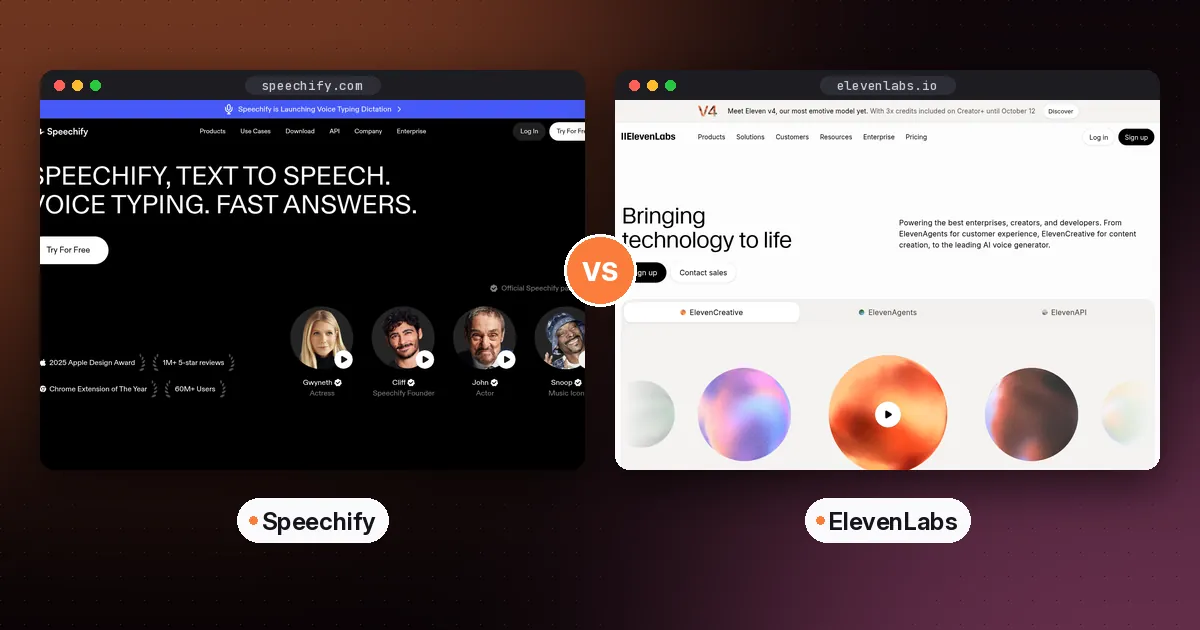
In Speechify vs ElevenReader, pick ElevenReader if you mostly listen on a phone and want natural voices for the lowest price: its free plan covers about one book a month and Ultra costs $11 a month or $99 a year. Pick Speechify if you read at a desk, because it has native Mac and Windows apps that read text in any app, plus voice typing and AI tools, for $29 a month or $139 a year. ElevenReader is the better value for listening. Speechify is the broader desktop toolkit.
Every price and feature below comes from each vendor's own pricing page and help pages, first checked on October 5, 2026 and rechecked in full on November 27, 2026. We have not run a side by side listening test ourselves, so treat voice quality as something to judge with your own files (there's a 15 minute test at the end). What changed on November 27: Speechify's pricing page now lists 400+ natural voices on Premium (it said more than 1,000 earlier this year), ElevenReader's help center lists scanned pages and Kindle ebooks as sources, and both vendors' desktop and offline rules are covered below. Students should also read is Speechify free for students.
Speechify vs ElevenReader at a glance
| Item | ElevenReader | Speechify |
|---|---|---|
| Made by | ElevenLabs | Speechify |
| Free plan | 10 hours of text to audio a month, 1,000+ voices, up to 4x | 10 basic voices, up to 1.5x |
| Paid plan | Ultra, $11 a month or $8.25 a month billed annually ($99 a year) | Premium, $29 a month or $139 billed yearly (about $11.58 a month) |
| Free trial | 3 days of Ultra | Free plan to try |
| Paid voices | 1,000+ (same as free) | 400+ natural voices |
| Maximum speed | 4x | 5x on Premium |
| Languages | 90+ | 60+ on Premium |
| Your own files | PDF, EPUB, DOCX, TXT, HTML, web links, pasted text, scanned pages | PDF, EPUB, DOCX, XLSX, TXT, web links, pasted text, scanned pages on Premium |
| Audiobooks | Thousands free; 200,000+ premium titles with 20 hours a month on Ultra | Not part of Premium |
| Desktop | Web app and Chrome extension | Native Mac and Windows apps, web app, Chrome and Edge extensions |
| Phone | iPhone, iPad, Android | iPhone, iPad, Android |
| Extras | Offline downloads, custom voices, a voice per character, smart imports | AI summaries and chat, voice typing, AI podcasts, cloud drive integrations |
Free plans compared
This is where most people decide, because both apps are easy to try.
ElevenReader's pricing page lists a free plan with 10 hours of text to audio every month, which it describes as about a 400 page book. You get the full set of more than 1,000 voices, thousands of free audiobooks, sync between web and mobile, up to 4x speed, a sleep timer and bookmarks. Two details from its FAQ matter. First, hours are only used when you generate new audio from your own files; replaying audio you have already generated, and listening to the free books in its Explore library, costs nothing. Second, hours are counted at normal 1.0x speed, so listening at 2x burns through them faster in clock time. Free hours reset every month and don't roll over.
Speechify's pricing page lists a free plan with speeds up to 1.5x and 10 voices that Speechify itself describes as robotic sounding, limited to text to speech features. The basic voices and the speed cap are a big step down from Premium, so the free plan is best for short documents. If you only listen on a computer, the free Read Aloud extension may be enough; see Speechify vs Read Aloud.
Verdict: ElevenReader's free plan is far more generous on quality. Speechify's free plan works for occasional use, but it's mainly a way to try the app before paying.
Paid plans compared
ElevenReader Ultra costs $11 a month, or $8.25 a month billed annually, which the pricing page says saves $33 a year. It lifts the monthly hours limit on your own imports, adds 20 hours a month of premium audiobooks from a catalog of more than 200,000 titles, and allows offline downloads. You can also design custom voices, give each character in a book its own voice, and use smarter imports that skip headers, footers and filler text in PDFs. There's a 3 day free trial.
Speechify Premium is listed at $29 a month on monthly billing or $139 billed yearly, which the pricing page describes as a 60% saving. It adds 400+ natural voices in over 60 languages and speeds up to 5x. It also adds Scan and Listen for printed pages, AI summaries and chat about what you're reading, and integrations with Google Drive, Dropbox and Microsoft OneDrive. Beyond reading, Premium includes voice typing, AI podcasts that turn content into shows, and a voice AI assistant you can talk to about a web page or book.
On yearly billing the gap is smaller than the monthly prices suggest: $99 a year for ElevenReader Ultra against $139 a year for Speechify Premium, a $40 difference. On monthly billing it's $11 against $29.
Verdict: for pure listening, ElevenReader Ultra costs less on either billing cycle. Speechify Premium makes sense if you'll use its desktop apps, dictation and AI features too.
What "unlimited" means on ElevenReader Ultra
ElevenReader sells Ultra as unlimited listening for your uploads, and the pricing FAQ spells out the fine print:
- A daily cap. Unlimited means up to 24 hours of generated audio per calendar day, measured at 1.0x speed. That's far more than one person can listen to, so it only matters if you try to convert a whole library at once.
- Offline downloads have their own limits. Ultra includes 150 hours of offline downloads a month and up to 20 hours a day. Downloads stay in the app for up to 60 days and are removed when you sign out.
- No exporting. Audio can't be exported or shared as files. Offline copies play only inside ElevenReader.
- One person per account. There's no family plan, and the FAQ says shared accounts can be deactivated without a refund.
- Hours you pay for roll over. Hours from a subscription or a one time pack last 12 months, and the app spends the ones that expire soonest first.
Voices and listening experience
ElevenReader runs on Eleven v4, which ElevenLabs' help center calls its most expressive text to speech model, and it supports more than 90 languages. That matters most in long sessions, such as a full report or a novel, where a flat voice becomes tiring.
Speechify's Premium voices are also natural, and its highlight as you listen view helps if you like to follow along on screen. That matters for many readers with dyslexia or ADHD, and for anyone learning a language. Speechify's 5x top speed is faster than ElevenReader's 4x, which appeals to experienced speed listeners.
Desktop use: where Speechify pulls ahead
Speechify has native apps for both desktop systems. The Mac app is now a direct download from Speechify's site rather than the App Store, and its Mac app guide explains the main trick: select text in any app and press Option + A to hear it read with highlighting, no upload needed. A Screenshot to Listen shortcut reads text inside images, and holding the Fn key starts dictation into whatever app is active, with a choice of an on device engine or a cloud engine. Speechify launched its Windows app on March 31, 2026 through the Microsoft Store, for both Intel or AMD and Arm64 PCs, with the same choice of on device or cloud processing. Chrome and Edge extensions cover the browser.
ElevenReader has no desktop app. On a computer you use the web app at elevenreader.io and its Chrome extension. The extension's help page says it imports the page you're on (including pages you can only see when logged in), offers to import EPUB, PDF and TXT files as you download them, prompts you when you highlight more than 1,000 characters, and can merge chapters into one read with an Add Next Chapter button, which suits web novels. It imports; it doesn't read text in other apps.
Phones, scanning and ebooks
On a phone the two are closer than they used to be. Both have iPhone, iPad and Android apps, and both can now scan printed pages: ElevenLabs' help center lists scanned pages, Google Docs, Kindle ebooks and X threads among the things ElevenReader reads, while Speechify lists Scan and Listen as a Premium feature. Speechify's scanning has a two page Book mode, which our Speechify vs Read Aloud guide walks through.
For ebooks, ElevenReader uploads EPUB files you own. Books with DRM usually won't upload, but its help center says Kindle books you already own can be opened through its Open a webpage option, which plays them in place without adding them to your library.
A caveat for textbooks: ElevenLabs' own textbook guide warns that equations, diagrams, tables, charts and special symbols may not read well, and suggests keeping the original page open.
Speechify vs ElevenLabs: clearing up the confusion
People often search for Speechify vs ElevenLabs. ElevenLabs is the company, and its main product is a voice platform for creators and developers, used for voiceovers, dubbing and audio for apps. ElevenLabs' pricing page lists credit based plans for that work: a free tier with 10,000 credits a month, Starter at $6 a month, and Creator at $22 a month at regular price (it was running a promotion on some plans until December 1 when we checked). ElevenReader is its separate listening app for people who want to hear their reading, and ElevenLabs also has a new Mac meeting notes and dictation app, covered in our ElevenAI guide. If you want to listen to documents, compare Speechify with ElevenReader, not the ElevenLabs creator platform.
Pros and cons
ElevenReader
- Pros: very natural voices, a generous free plan, low Ultra price, premium audiobooks included, offline downloads, 90+ languages.
- Cons: no desktop app, audio can't be exported, fewer AI extras, and free hours run out if you import a lot.
Speechify
- Pros: native Mac and Windows apps that read text in any app, voice typing, AI summaries and up to 5x speed.
- Cons: expensive on monthly billing, the free voices are basic, and scanning needs Premium.
Who should choose which
- Commuters and audiobook fans: ElevenReader. The free plan covers a book a month, and Ultra adds premium audiobooks.
- Students with heavy reading lists: ElevenReader for value. Its pricing FAQ says there are no dedicated student discounts yet, though its help center says some schools and accessibility programs offer free or discounted access. Speechify has its own school and education routes, covered in our student guide above, and the best AI tools for students covers the rest of a study setup.
- Readers with dyslexia or ADHD who read on a laptop: Speechify, for its desktop apps and follow along highlighting.
- People who also want to dictate: Speechify includes voice typing, though a dedicated tool may be more accurate. See Wispr Flow vs Superwhisper, our Wispr Flow profile, and the roundup of Wispr Flow alternatives for free and offline options.
Other ways to listen to your reading
- Gemini Notebook's Audio Overviews turn your sources into a podcast style discussion rather than reading them word for word. It's a good review tool for coursework. See how to use NotebookLM for studying.
- Read it later apps with voices. Instapaper Premium includes AI voices and text to speech playlists, according to its Premium page; our guide on how to use Instapaper covers its Speak player. Matter Premium adds HD text to speech on iPhone and iPad. Readwise Reader is a strong place to save articles before you listen. Our guide to the best read it later app compares the options.
How to test both in 15 minutes
- Install both free versions on your phone.
- Import the same document into each, ideally a PDF with headers, footnotes and page numbers.
- Listen for five minutes at your usual speed in each app.
- Note which voice you could listen to for an hour, and whether either one reads out page clutter.
- Check where you'll listen most. If it's at a desk, try Speechify's desktop app shortcut and ElevenReader's Chrome extension on the same article.
FAQ
Is ElevenReader better than Speechify?
ElevenReader is better value for listening, with natural voices on its free plan and a cheaper paid plan. Speechify is better if you want native Mac and Windows apps, voice typing and AI tools in one subscription.
Is ElevenReader free?
Yes. ElevenReader's free plan includes 10 hours of text to audio each month, more than 1,000 voices, thousands of free audiobooks and speeds up to 4x. Ultra lifts the hours limit for your imports, up to 24 hours of audio a day.
How much does Speechify cost?
Speechify Premium is listed at $29 a month on monthly billing or $139 billed yearly (the page calls it a 60% saving). There's also a free plan with 10 basic voices and speeds up to 1.5x.
Is Speechify the same as ElevenLabs?
No. They're different companies. ElevenLabs makes the ElevenReader listening app and a separate voice platform for creators. Speechify is an independent company whose main product is its text to speech reader.
Can I download or export audio from ElevenReader?
You can download for offline listening on Ultra (150 hours a month, kept for up to 60 days), but you can't export audio files. Downloads play only inside the app.
Can these apps read PDFs and printed pages aloud?
Yes. Both read PDFs, EPUB, DOCX and TXT files, and both can scan printed pages with your phone camera; on Speechify scanning is a Premium feature. Expect equations, tables and diagrams to read poorly in either app.